



























































































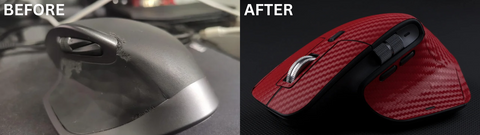

If the thumb rest on your Logitech MX Master 3 or 3S has turned sticky, shiny or started to peel, you are not alone. It is the most common complaint from long-term owners of an otherwise excellent mouse. This guide explains why it happens, what you can do about it today, and how to stop it for good.
Short answer: cleaning slows the damage, but once the rubber is sticky it will not recover. Either remove the damaged layer or cover it with a skin cut for your exact model.
MX Master 3S skins · MX Master 3 skins · MX Master 4 skins · from $18.99, 4.6★ from 26 reviews
What the problem looks like
- The thumb rest or palm area feels tacky or gummy.
- Shiny, smooth patches appear where your hand rests most.
- The coating starts to blister, flake or peel at the edges.
- Dirt sticks to the surface and won't wipe off.
Why the rubber grip wears out
The MX Master 3 and 3S use a soft rubber coating on the thumb and palm areas. Over months of daily use it breaks down, and a few things speed that up:
- Sweat and skin oils. Hours of contact every day slowly soften the coating. This is why the thumb rest goes first.
- Heat and sunlight. A mouse left near a window or a hot laptop vent ages faster.
- Harsh cleaners. Strong solvents and some wipes strip the surface and make it sticky sooner.
- Time. Even with perfect care, soft rubber coatings degrade with age. It is a material limit, not something you did wrong.
How to slow it down (if your grip is still fine)
- Wipe it weekly with a soft microfiber cloth, slightly damp with water or a drop of mild soap, then dry it.
- Skip harsh chemicals on the rubber parts.
- Keep it out of direct sun and away from heat sources.
- Cover it early. A skin keeps oils and sweat off the rubber entirely, which is the most effective step.
How to fix a grip that is already sticky or peeling
Once the coating turns sticky, cleaning will not bring it back. You have three options:
- Check your warranty. If your mouse is still under Logitech's warranty, contact Logitech support first.
- Remove the damaged layer. Many owners wipe off the degraded coating with isopropyl alcohol on a cloth. Test a small area first. What is left is bare plastic, which is clean but more slippery than the original grip.
- Cover it. A precision-cut skin goes over the thumb rest, palm and sides. It gives you a dry, non-sticky surface and keeps the mouse looking new. Remove any loose flakes first so the skin sits flat.

Covering it for good: Capes MX Master skins
- Cut for your exact model: separate cuts for the MX Master 3, 3S and 4, shaped around the scroll wheels and buttons.
- 3M vinyl: thin enough to keep the shape and feel of the mouse, and removable without residue.
- Many finishes: from subtle Black Leather and Carbon Fibre to Black Camo, Storm and colours.
- Easy to apply: warm the pieces with a hairdryer so they stretch over the curves, then press them down.
Shop MX Master 3S skins →
Shop MX Master 3 skins →
Shop MX Master 4 skins →
Tip: clean the surface before you apply. The 5-in-1 Tech Cleaner is made for exactly that.
What customers say
"It's a great fit and life changer for my MX 3S as the rubber skin severely degraded with blisters and peeling. Thanks Capes for making this product!"
— Verified buyer, ★★★★★
"My MX Master's rubber part was in a very bad shape so I removed it and the plain black plastic didn't look pleasing and was too slippery. So I added this case. It looks great and feels great in the hand too."
— Ashhar H., ★★★★★
"Great fit - but you need a hairdryer to make the 3M foil work ;-)"
— Jörg K., ★★★★★
Average rating 4.6 from 26 reviews. One reviewer found the finish less grippy than the original rubber; if grip matters most to you, choose a textured finish.

FAQ
Can I put a skin over rubber that is already peeling?
Yes, but peel or wipe off any loose flakes first. The skin sticks best to a clean, smooth surface.
Will a skin affect tracking or the buttons?
No. The skin covers the top and sides and is cut around the scroll wheels and buttons, so everything works as before.
Will it leave residue if I remove it?
No. The 3M vinyl comes off cleanly.
How often should I clean my MX Master?
A quick wipe once a week if you use it daily, and a more thorough clean once a month.
Do you make skins for other Logitech mice?
Yes: the MX Master 2S, the MX Anywhere 3 and more. See all MX Master skins.

Leave a comment
This site is protected by hCaptcha and the hCaptcha Privacy Policy and Terms of Service apply.